
The HTTPS Illusion
How Burp Suite lets you inspect encrypted web traffic
You log in to a website. You type a username and a password. Your browser sends that request over HTTPS, so anyone watching the network should see scrambled data, not the password.
Then you open Burp Suite, a tool security testers use to look at how a web application actually behaves. You point the browser at Burp and log in again. In Burp you can read the same request: the path, the headers, the cookie, even the password field. You can change a value and send it on.
If HTTPS encrypts the information, how can Burp Suite read it? Does Burp know the website's private key? Does it break encryption?
No. Burp does not need to break the original browser-to-website TLS connection. It acts as a trusted endpoint for one secure connection and creates a separate secure connection to the website.
That is the idea this article unpacks. You do not need to have used Burp before. You do not need to already know TLS. Each idea is explained in ordinary English first, then with the correct technical name.
The HTTPS Illusion
HTTPS looks like one private pipe from your browser to the website. The lock in the address bar feels like proof of that. The illusion is that the lock only means: the browser finished a secure handshake with someone it was willing to trust. That someone is not always the website you had in mind.
A short analogy, then we leave it behind.
Imagine a customer sending a locked box to a company, but first handing it to a trusted inspection desk. The desk can open the lock that was made for the desk, inspect the papers, then put them in a new locked box and send that box to the company. The desk did not steal the company's lock. It did not pick a lock that was meant to go straight to the company. The customer locked a box for the desk. The desk locked a different box for the company.
Burp is that desk. Real HTTPS does not use physical locks. It uses cryptography. Each connection negotiates its own traffic-protection keys. There is no single shared key that Burp copies from the website. The rest of this article is the software version of that picture.
How HTTPS Normally Works
Without Burp, the picture is simple:
Browser → encrypted HTTPS connection → Website
HTTP is the language of web requests (GET /account, headers, cookies, a body). HTTPS is that same HTTP carried inside TLS (Transport Layer Security). TLS does two jobs that matter here: it encrypts the data while it travels, and it lets the browser check that it is talking to the server it intended.
Before the browser sends the password, it needs a reason to trust the other end. The website presents a certificate: a signed statement that binds a name such as example.com to a public key. The browser checks the name, the dates, the signature, and whether the chain of signatures leads back to a certificate authority (CA) already in its trust list. A CA is an organisation or system the browser already treats as allowed to issue those statements.
If those checks pass, the browser and the website establish TLS. From then on, HTTP rides inside that encrypted connection. A person on the network sees TLS records, not GET /account.
Encryption here protects the data in transit between the two TLS endpoints. It does not hide the request from an endpoint. If the other end of the connection is Burp, Burp is allowed to read the HTTP after TLS has done its job. That is not a bug in HTTPS. It is how TLS works once you change who the peer is.
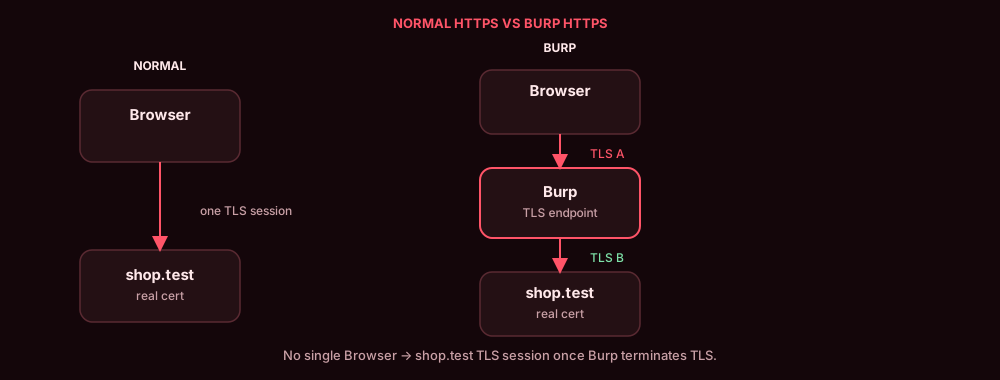
A proxy is a program in the middle. You configure the browser to send traffic to Burp (often 127.0.0.1 port 8080) instead of sending it straight to websites. A port is a numbered door on a computer. 443 is the usual HTTPS door. Once the browser uses Burp as that middle program, the "one pipe to the website" picture is no longer the path.
First, the Browser Connects to Burp
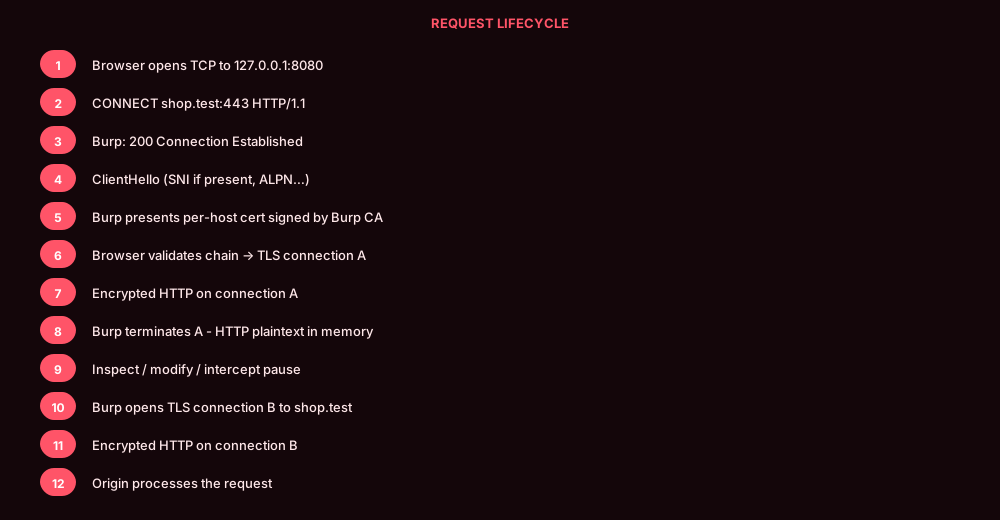
When the browser is set to use Burp as an explicit HTTP proxy, it has already been told: send web traffic to Burp, on purpose. Before TLS starts, the browser still needs to tell Burp which website it wants.
It commonly sends this HTTP message to Burp, not to the website:
CONNECT example.com:443 HTTP/1.1
Host: example.com:443
In plain English: "Proxy, open a path to example.com on port 443."
Burp replies:
HTTP/1.1 200 Connection Established
That means Burp has agreed to open a tunnel: a TCP path through the proxy toward that host and port. TCP is the basic reliable pipe the internet uses. The browser cannot start TLS until some TCP path exists. With an explicit proxy, that path is "browser to Burp," and CONNECT is how the browser names the intended website before encryption begins. After this reply, the browser can start TLS through the tunnel.
CONNECT is an HTTP proxy mechanism. It is not a TLS message. It is not sent to example.com. HTTPS does not always begin with CONNECT. That is the typical flow for an explicit HTTP proxy. Some apps are not proxy-aware at all. For those, testers use invisible (sometimes called transparent) proxying: traffic is redirected to Burp by the network, and there is no CONNECT. This article follows the common browser-plus-Burp setup unless a later section says otherwise.
After 200 Connection Established, the browser starts TLS with whoever is at the other end of the tunnel. From the browser's point of view, that is Burp. So Burp must present a certificate the browser will accept for example.com.
Why Does the Browser Trust Burp?
If Burp presents a certificate that says "I am example.com", why doesn't the browser reject it?
Your browser already has a list of CAs it trusts. A public website normally uses a certificate issued by one of those CAs. The browser accepts the site because the certificate's name matches, the signature checks, and the chain reaches a trusted CA.
Burp ships with its own CA, the Burp CA. On first run it creates one CA for that installation. That CA is not the website's CA. You install the Burp CA in the testing browser or operating-system trust store. That is a deliberate lab decision. You are telling the browser: "treat this extra CA as a trust anchor while I test."
Once the Burp CA is trusted, Burp can sign certificates for hostnames you visit. Signing, in simple English: the CA uses its private key to create a digital signature. The browser verifies that signature with the CA's public key. If the signature is valid and the other certificate checks pass (name, dates, chain), the browser can accept the certificate.
Installing the Burp CA does not switch HTTPS off. The browser still encrypts the connection. It still checks the hostname, the dates, and the signature. A Burp-generated certificate for evil.example will not satisfy a visit to example.com. You changed who is allowed to vouch for a name. You did not turn off the checks.
An attacker can create a CA too. A normal browser still rejects it, because that CA is not in the trust list. Burp works in a lab because you put the Burp CA there.
The Certificate Burp Creates
You visit https://example.com. Burp needs a certificate to show the browser for that name.
Burp CA → signs → Burp-generated certificate for example.com
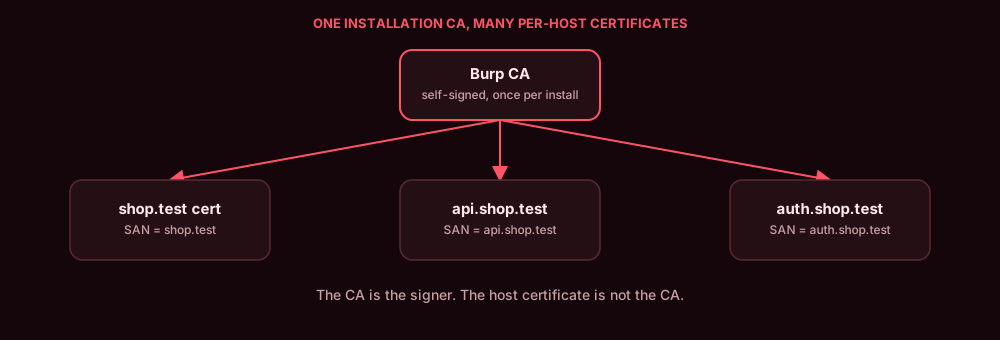
Burp generates (or reuses) a certificate for example.com and signs it with the Burp CA. People sometimes call this a "fake certificate." The accurate name is a Burp-generated, CA-signed host certificate. It is a real certificate object. It is not the website's certificate.
The browser can accept it because:
- the name matches
example.com - it is signed by the Burp CA
- the Burp CA is in the trust store
- the usual extra checks (dates and so on) pass
To the browser, that certificate is the identity of the TLS peer on this connection: Burp, claiming the name example.com. Burp does not send that generated certificate to the real website as the website's identity. The website still presents its own certificate to Burp.
Four different things:
| Thing | What it is |
|---|---|
| Burp CA certificate | The trust anchor you installed. Public. Not a secret. |
| Burp CA private key | Stays in Burp. Used to sign generated host certificates. |
| Generated host certificate (and its private key) | What the browser sees on the Burp side. Identity for example.com on that hop only. |
| Real website certificate (and the website's private key) | What the website presents to Burp. Burp does not need that private key. |
How does Burp know to put example.com on the generated certificate? On the explicit-proxy path, CONNECT already named it. TLS can also include SNI (Server Name Indication), an optional extension in the first TLS message that can carry a hostname. SNI is not a certificate. SNI is not a validation check. SNI is not guaranteed to be present.
The Two Secure Connections
This is the architecture. Everything else is detail around it.
Browser → TLS connection A → Burp → TLS connection B → Website
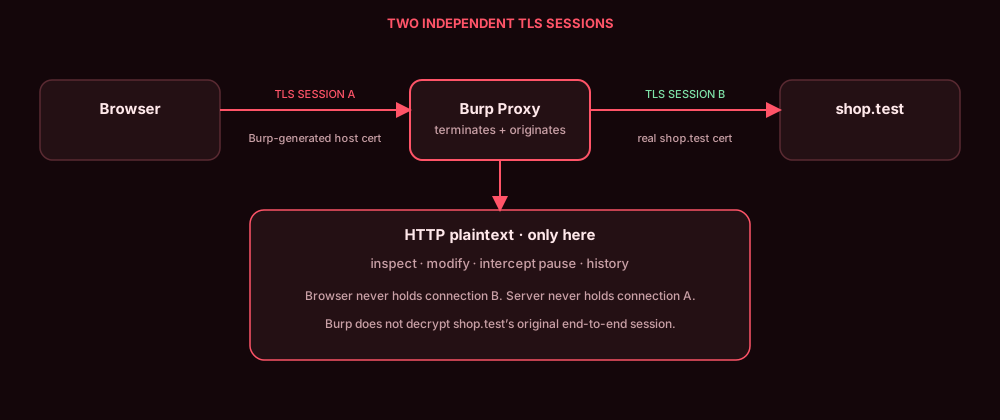
Your browser is not talking directly to the website. It has a secure connection to Burp. Burp reads the request and sends it to the website through a second secure connection.
Connection A: browser to Burp. The browser establishes TLS with Burp. Burp presents the generated host certificate. The browser trusts it because the Burp CA is trusted. Encrypted data still travels on the wire between browser and Burp. Once it reaches Burp, Burp can read the HTTP, because Burp is the other end of that TLS connection. That end is called a TLS endpoint. Ending the encryption there so the program can work with the HTTP is TLS termination.
Connection B: Burp to website. Burp opens a separate TLS connection to the real website. The website presents its real certificate. Burp validates that certificate according to its TLS settings (trust, hostname, validity). It does not blindly accept every server certificate. Burp then encrypts the outgoing HTTP for this hop. On connection B, Burp is a TLS client, the role your browser usually plays.
Upstream here means "toward the real website."
The two connections establish their traffic-protection keys independently. Each handshake produces keys for that hop. In technical terms, TLS derives traffic-protection keys separately for connection A and connection B. Those keys are not a single secret copied off the website, and they are not posted across the network as "the session key."
| Connection A | Connection B | |
|---|---|---|
| Who talks | Browser and Burp | Burp and the website |
| Certificate the TLS client sees | Burp-generated host certificate | The real website certificate |
| Who is the TLS server | Burp | The website |
Burp does not need the website's private key. It does not reuse "the browser-to-website session keys," because that single session is not the path. Connection A and connection B never share one TLS session.
TLS 1.2 and TLS 1.3 differ in handshake details. For Burp, the architecture does not change: two connections, two sets of traffic-protection keys.
Follow One Real Request
You open https://example.com/account. The browser uses Burp as its proxy.
GET /account HTTP/1.1
Host: example.com
Cookie: session=example
That is a simplified illustration of what Burp can display. It is not what a network observer sees between the browser and Burp. Those observers still see TLS records. Burp sees this HTTP because Burp terminated connection A.
- The user opens
https://example.com. - The browser routes the request through Burp (
CONNECTon an explicit HTTP proxy). - The browser establishes TLS connection A with Burp.
- Burp establishes or reuses TLS connection B to the website.
- The HTTP request is readable to Burp at the browser-facing TLS endpoint.
- Burp can inspect, modify, pause, drop, or forward it. Repeater can reuse it.
- The request travels to the website over connection B.
- The website sends its response to Burp.
- Burp reads the response and sends it to the browser over connection A.
Intercept ON can pause matching messages so you can look, edit, drop, or click Forward. Intercept OFF does not, by itself, turn off TLS interception. History can still fill. You can still send the message to Repeater. There is simply no pause. Intercept ON/OFF is the manual pause. It is not the same switch as "is Burp a TLS endpoint?"
The website never sees the Burp-generated certificate. The browser never holds the website's private key. HTTP is visible only inside Burp, between the two TLS connections.
What Can Stop Burp from Reading HTTPS?
Trusting the Burp CA is enough for a normal browser. It is not enough for every client.
Certificate pinning. Some apps require a particular certificate or public key, often built into the app, and reject Burp's generated certificate even if the Burp CA is installed. Pinning is an extra identity check. It is not the same as "the CA is untrusted."
TLS passthrough. Burp can forward encrypted TLS without terminating it. Then Burp is not an endpoint of that connection. It cannot inspect or modify the HTTP inside. Use this when you do not want to intercept a host.
Browser  →  encrypted TLS  →  Website
              (Burp only forwards)
Passthrough is the opposite of TLS termination.
Mutual TLS (mTLS). The server can also require the client to prove its identity with a certificate. That is a second authentication step. A client certificate on connection A does not automatically appear on connection B.
HTTP/2 and ALPN. During TLS, the two sides can agree which HTTP version to use. That agreement is ALPN (Application-Layer Protocol Negotiation), typically HTTP/1.1 or HTTP/2. Because A and B are separate TLS connections, each hop can pick its own version. They do not have to match.
Invisible proxying and SNI. Some clients never send CONNECT. Invisible proxying sends their traffic to Burp by routing instead of by browser proxy settings. When available, SNI can help identify the hostname. SNI is not guaranteed, and it is not a certificate.
Put It All Together
The browser encrypts the login for the connection it has with Burp. Burp is trusted to handle that connection, so it can read the request. Burp sends the request to the real website over a second encrypted connection. The website talks to Burp. Burp passes the response back to the browser.
Browser → TLS connection A → Burp → TLS connection B → Website
Remember these distinctions
CONNECTis not TLS.- SNI is not a certificate.
- Burp's CA is not the website's CA.
- Burp's generated host certificate is not the website's original certificate.
- TLS connection A is separate from TLS connection B.
- TLS termination is not TLS passthrough.
- Intercept ON/OFF is not the same as enabling or disabling TLS interception.
Burp does not need to break HTTPS. It becomes the browser's trusted secure endpoint, reads the request, and sends it onward through a second secure connection.